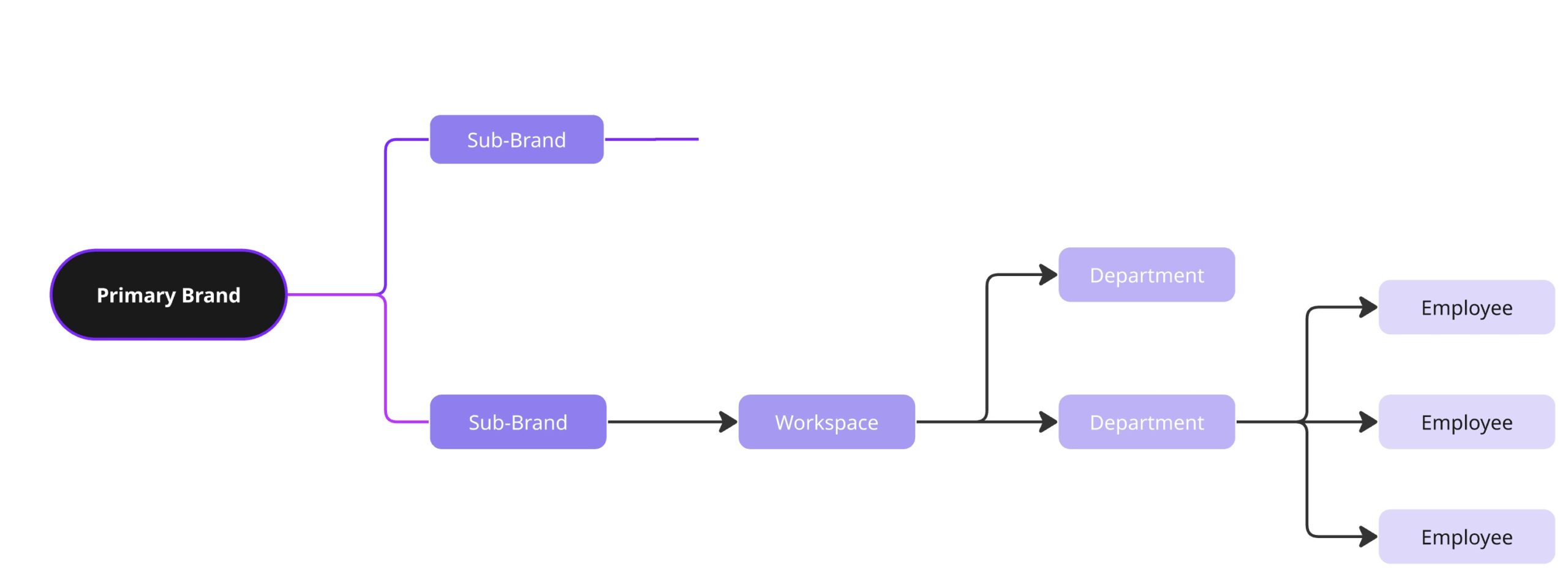
A well-structured Brand Hierarchy in Ex.Brain is the foundation for secure data visibility, efficient team management, and clear reporting. Whether you’re a hospitality group managing multiple properties, an M&A firm overseeing portfolio companies, or a large enterprise with decentralized departments—getting your brand structure right will save time and reduce confusion later.
This guide walks you through how to strategically plan and maintain:
- Your Primary Brand
- How and when to use Sub-Brands
- Consistent and clean Workspaces
Keep Your Brand Hierarchy Strategic, Not Overcomplicated #
1. Only Use Sub-Brands for Real Business Units #
Create a Sub-Brand only when it represents an operationally distinct group. Ask:
- Does it have a separate team or reporting structure?
- Does it require different permissions or datasets?
- Does it serve a different business objective?
Good Example:
“Marriott East Coast” and “Marriott International Franchises” as separate Sub-Brands for different regions and ownership models.
❌ Avoid:
Creating a Sub-Brand for each hotel floor or each department within a single business unit. That level of granularity belongs in Workspaces or Teams.
2. Mirror Your Real Organizational Structure #
Align Ex.Brain’s brand setup with your real-world business structure:
- If you’re a holding company, mirror your legal or operational entities.
- If you work across regions or markets, use those geographies as Sub-Brands.
- If you manage multiple client brands, each one could be a Sub-Brand.
Why it matters:
Your team already understands the real-world structure. Replicating it inside Ex.Brain means faster onboarding, less training, and less confusion.
3. Use Consistent Naming Conventions for Workspaces #
Pick a naming style and enforce it across your brand. This keeps things scannable and filterable—especially important when managing dozens (or hundreds) of locations.
Good Naming Patterns:
- By Location: Chicago Hub, Canada HQ
- By Region or Branch: Region 5, Airport Lounge – JFK
- By Department: OPS – Midwest, HR – Corporate
- By Code: Store #205, Hotel #MIA03
Pro Tip:
Use a standard prefix like FIN – or OPS – to make workspace search and permissions setup easier.
4. Always Assign Data and People Correctly #
Your security and insights depend on it.
- Every Block should be linked to the correct Workspace—it determines who can access it.
- Assign Employees to the Workspace where they physically or operationally belong.
- Only create departments like HR or Finance inside Workspaces if those roles exist there.
If you're managing several car dealerships, for example, don’t add all employees to a single "HQ" workspace. Each location should be isolated unless there’s a clear operational overlap.
5. Avoid Duplicates, Typos, and Redundancy #
Before you create a new Sub-Brand or Workspace:
- Search to ensure it doesn’t already exist under a different name.
- Avoid naming variations that confuse users and AI (e.g., “LAX Lounge” vs. “Los Angeles Airport Lounge”).
Standardize everything—especially for reporting and access logic.
6. Set Up a Quarterly Review Process #
As your business evolves, so should your brand structure. Every quarter:
- Merge or archive inactive Workspaces
- Rename for clarity and consistency
- Confirm employees, departments, and blocks are correctly placed
This process ensures data cleanliness and audit readiness—crucial in M&A and highly regulated sectors.